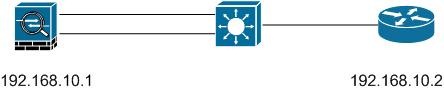
Switch side
Switch(config)#int fa0/9
Swtich(config-if)#switchport
Swtich(config-if)#switchport trunk encapsulation dot1q
Swtich(config-if)#switch trunk allowed vlan 100,101 (if not specified, every vlan will send to ASA)
Swtich(config-if)#swtichport mode trunk (ASA cannot negotiate trunk using dynamic protocol)
Swtich(config-if)#no shut
ASA side
NOTE: Each physical interface of ASA carry one or more sub interfaces, each carries one vlan
ASA(config)# int e0/3
ASA(config-if)# no shut
ASA(config)# int e0/3.1
ASA(config-subif)# vlan 100 ; specifies which vlan carried over this sub interface
ASA(config-subif)# nameif inside
ASA(config-subif)# ip address 10.1.1.1 255.255.255.0
ASA(config)# int e0/3.2
ASA(config-subif)# vlan 101
ASA(config-subif)# nameif building1
ASA(config-subif)# security-level 50
ASA(config-subif)# ip address 10.2.1.1 255.255.255.0
ASA(config-subif)# no shut
Trunk interface on firewall module
cat6500#show vlan : to see vlan inside switch
cat6500#show module : to see connected module number
cat6500#config t
cat6500(config)#firewall vlan-group 1 10,100 ;says which vlan should send to firewall module, vlan group number can be anything.
cat6500(config)#firewall module 3 vlan-group 1 ; to which firewall module to send these to
Cat6500#session slot 3 processor 1
FWSM> enable
FWSM# config term
FWSM(config)#interface vlan 10
FWSM(config-if)#nameif outside
FWSM(config-if)# ip address 192.168.10.1 255.255.255.0
FWSM(config-if)#no shut
FWSM(config-if)#exit
FWSM(config)# int valn 100
FWSM(config-if)#namif inside
FWSM(config-if)#ip address 172.30.10.1 255.255.255.0
FWSM(config-if)#no shut
FWSM#show int