Monday, November 28, 2011

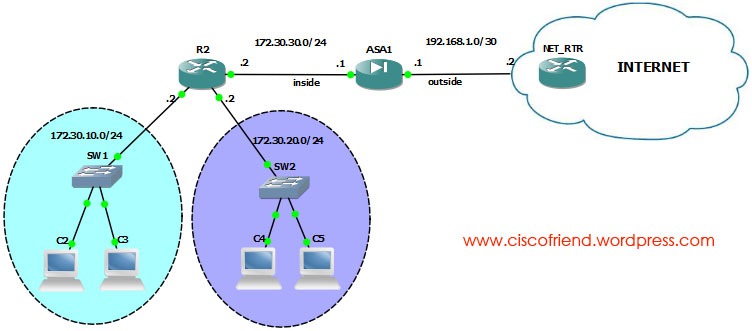
ASA static/Default Routing configuration

ASA STATIC DEFAULT ROUTING
Syntax of static route configuration is :
Route <interface-name> <ip address> <netmask> <gateway ip> [distance]
Objects:
  • Configure static routing to inside interface
ASA1(config)#route inside 172.30.10.0 255.255.255.0 172.30.30.2 1
ASA1(config)#route inside 172.30.20.0 255.255.255.0 172.30.30.2 1
  • Configure default route to internet
ASA1(config)#route outside 0.0.0.0 0.0.0.0 192.168.1.2
Note: we can use the command “route outside 0 0 192.168.1.2” for default route, both are same.

Saturday, November 26, 2011

Network Time Protocol (NTP) configuration

One time updatentp

If you want to synchronize with NTP server just now, then execute the following command:

$ sudo ntpdate 1.in.pool.ntp.org

Here 1.in.pool.ntp.org is the NTP server we are synchronizing with. You can find closer NTP server to your country from www.pool.ntp.org

NTP automatic synchronization through service

$ sudo apt-get install ntp

$ sudo service ntp start

If you want to synchronize with more closer NTP servers, then edit ntp.conf file by replacing the existing NTP servers with closer servers.

$ sudo nano /etc/ntp.conf

now change ntp servers if you want and save the file and restart the service

$ sudo service ntp restart

NOTE: if you are running other distributions than Ubuntu, then login as root and run the command without “sudo” in front of it

Friday, November 25, 2011

automatic login Ubuntu 11.10

sudo nano /etc/lightdm/lightdm.conf

now under [SeatDefaults], add the following

autologin-user=binoy

Note: here username is “binoy” . change it to your user name

Wednesday, November 23, 2011

Linux/Unix file system Hierarchy

/ root directory
/bin command binaries
/boot boot loader
/dev devices
/etc configuration files
/home user home directories (MacOSX uses ‘USERS’ directory to store home directories of users)
/lib library files for executables
/proc virtual file system (information about current running system)
/root root user home directory
/sbin system binaries (binaries that should run by system not users)
/tmp temporary file storage
/usr user binaries , often read only; (install by user like open office)
/var variable files, log, mail
/media mount place for removable media

/mnt

legacy location for removable media

Sunday, November 6, 2011

createrepo rpm installation problem – solution

Error:

[root@server1 Packages]# rpm -ivh createrepo-0.9.8-4.el6.noarch.rpm
warning: createrepo-0.9.8-4.el6.noarch.rpm: Header V3 RSA/SHA256 Signature, key ID fd431d51: NOKEY
error: Failed dependencies:
    deltarpm is needed by createrepo-0.9.8-4.el6.noarch
    python-deltarpm is needed by createrepo-0.9.8-4.el6.noarch

Solution:

rpm -ivh createrepo-0.9.8-4.el6.noarch.rpm deltarpm* python-deltarpm*